LibreVPN
The app that keeps a private, encrypted link from your phone or computer to each of your servers, so your private apps work from anywhere. What it is, how to set it up and use it.
LibreVPN joins your phone or computer to your servers over a private network. A private network is a link that only your own devices can use. Once it is on, your private apps open as if you were at home, wherever you are, and none of them has to be put on the public internet.
It is a small app of its own. It keeps running in the background, even while the LibrePortal app updates or is closed, and it reconnects by itself when your internet changes.
A Preview
LibreVPN works, but it is version 0.x, so expect the odd rough edge. It is for Android, and for Linux computers. Download it from libreportal.org/download.
What it does#
- One network for each server. The LibrePortal app sets up each server's private network. LibreVPN holds and runs it. Each shows as one switch.
- Adding a server takes one tap. LibreVPN lists the servers in the LibrePortal app, so there is nothing to type.
- It looks after itself. It reconnects when your internet changes, and updating the LibrePortal app never interrupts your connections.
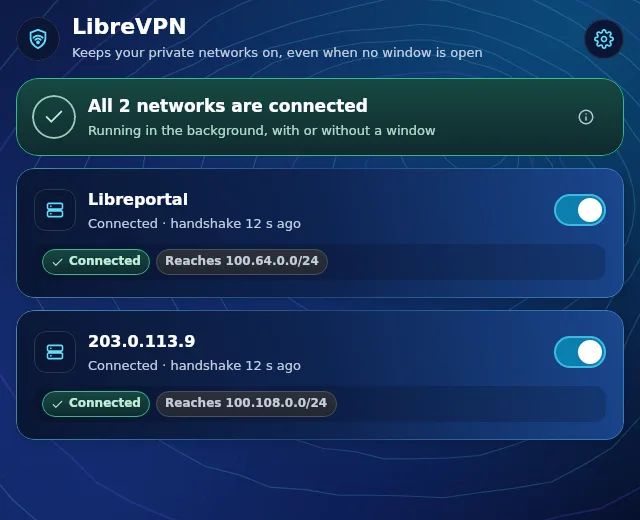
- It tells you the truth. Each network says Connected, Reconnecting or Not answering. Connected means the server really answered a moment ago.
- Your servers' private sites work through it. Sites that only answer your own devices, such as the control panel of a server, open normally while LibreVPN is on.
- Other apps can use it. LibreSync and LibreMoney reach your servers through it. LibreVPN asks you once before an app may use it.
- Your own WireGuard files can be imported and switched on and off. WireGuard is the VPN technology behind all this.
Set it up#
- Install LibreVPN from libreportal.org/download. On Android, allow installs from your browser once.
- Open it and allow it to be your VPN. Your phone or computer asks for this once. It is how a VPN app is allowed to work.
- Your servers appear. If the LibrePortal app is on the same device and has servers, LibreVPN lists them. Adding one is one tap.
- Switch a network on. Its status turns green and says Connected.
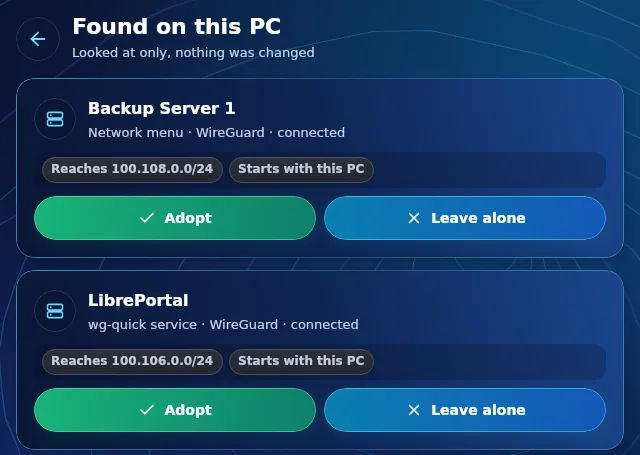
On a computer, LibreVPN can also find WireGuard connections that you already have, and offers to take them over. Pressing Adopt keeps the same name and addresses, switches the old entry off and starts LibreVPN's copy. If it does not connect within a few seconds, the old one is put back. Nothing is deleted, and you can hand it back with one tap. Leave alone keeps it as it is.
Everyday use#
- Switch a network off to stop using it, for example while you are at home and do not need it. Switch it back on any time.
- Add a device of yours, such as another phone, from the main page. It gets its own key and its own address on the network, which stays the same wherever the device goes. LibreVPN shows a QR code for the official WireGuard app, once.
- Settings has: start with this PC, show in the tray, and Connections left alone, which you can offer again.
- Apps allowed to use LibreVPN is a list of apps you said yes to. Remove one to take its permission away.
Which server's network is which#
Each network carries the name of its server, so you can tell them apart. Keys are renewed from the LibrePortal app, which swaps a key only once the new one works. See Networks and keys.
Why use it#
The LibrePortal VPN page explains the server side: what the network is and how devices get on it. LibreVPN is the way your phone and computer join it. You do not need LibreVPN to use the web address of a public app, only for what you keep private. See Who can reach what.
More#
- LibreVPN troubleshooting
- Connect a device to your VPN, for devices that use the plain WireGuard app
- DNS for your VPN