Addresses
Block an address by hand, keep an address from ever being blocked, and let extra addresses open private apps, all from Admin, Addresses in the web panel.
On this page
Admin, Addresses in the web panel puts three lists on one page. They do different jobs, and it is easy to mix them up.
| List | What it does |
|---|---|
| Blocked | Addresses that cannot reach your server. |
| Never block | Addresses that nobody can block, neither you nor CrowdSec. |
| Allowed in | Extra addresses that may open your private apps. |
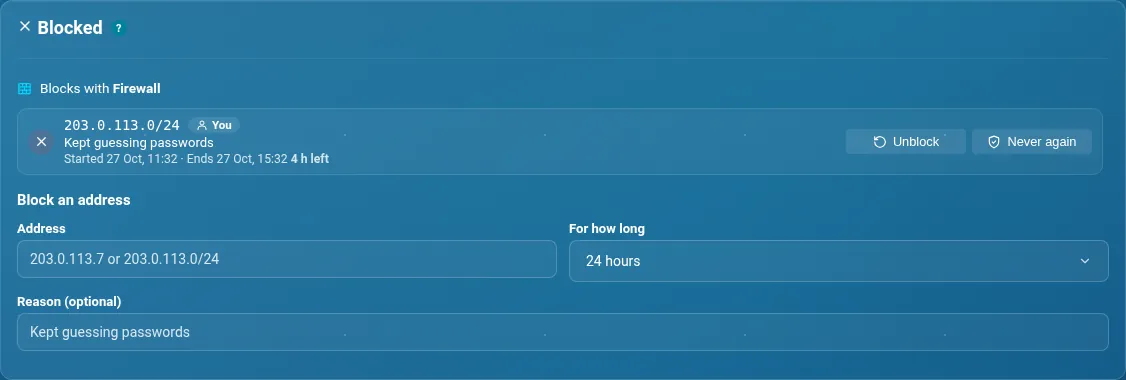
Blocked#
The list shows every block: the ones you made, the ones CrowdSec made when it saw bad behaviour, and the community list. A block ends by itself when its time is up. Each row gives a reason in plain words and says who made it.
To block an address, write it (for example 203.0.113.7, or a range like 203.0.113.0/24), choose For how long (24 hours by default) and add a reason if you like. Press Block. Your server blocks with what it has: CrowdSec if it is running, otherwise the firewall, otherwise its own list.
Each row has two buttons:
- Unblock lets the address back in. CrowdSec or the community list may block it again if it misbehaves.
- Never again lets it back in and adds it to Never block.
If a block could shut you out, or cut off the server or a device you use, the page says so in words and asks you to confirm a second time. The server has its own guards too. A range wider than /8 is refused.
Never block#
Addresses you rely on, such as your office or a friend's home. Add one with a reason, so you remember why. Nobody can block these, and that includes CrowdSec. This list does not let anyone in. Allowed in does that.
Allowed in#
Extra addresses that may open private apps. You can add an address, a range or a domain name, up to 20 in all. Below it, Trusted places are shown as read-only. They may also open the admin page, and you manage them in Access.
Which list do I want?
Keeping a good address from being blocked is Never block. Letting a new address reach private apps is Allowed in. Neither one blocks anyone. Blocked does that.
Advanced Do this from the command line
sudo -u libreportal libreportal security block 203.0.113.7 --for 24h --reason "Kept guessing passwords"
sudo -u libreportal libreportal security unblock 203.0.113.7
sudo -u libreportal libreportal crowdsec allow add --owner admin --cidr 203.0.113.0/24 --reason "My office"
Blocking by hand needs LibrePortal 0.10.60. The LibrePortal app shows and unblocks the same list.
New to the command line? How to run LibrePortal commands →