People and invites
For the person running the server, how to add people and invite their phones from the LibrePortal app. For the person invited, how to join and what the simple app shows.
On this page
For the admin: People#
Each server has a People section. It shows the people on your LibrePortal, the apps each can open, and their devices.
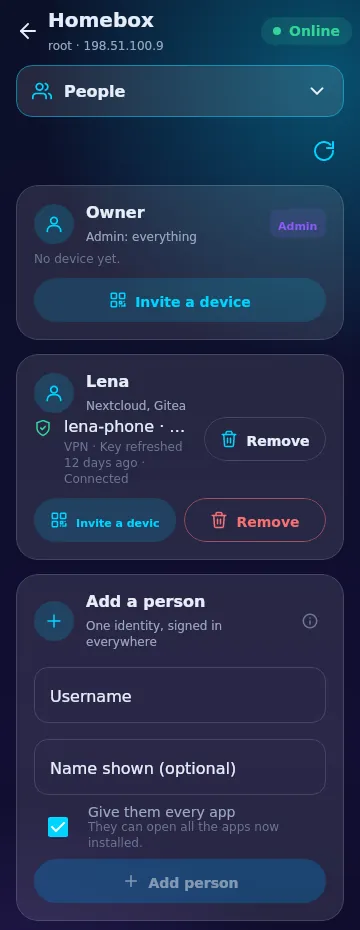
- Add a person. Type a username and, if you like, a name. The server makes a password and shows it once. Leave Give them every app ticked, or untick it to choose their apps later.
- Invite a device. Press it beside a person. The app shows a QR code, a share link and a copy button. The code works once.
- Remove. Shows first what would be cut off: their private-network devices, their signed-in apps and their open invites.
Each device shows whether it is connected, and when its key was last refreshed.
Needs LibrePortal 0.10.59
People and invites need LibrePortal 0.10.59 on the server. On an older one, the section says so.
What an invite gives#
An invited device gets exactly that person's own access: their own apps, on the server's private network. Never admin rights, and never SSH. The person's device makes its own VPN key, and the private half never leaves it. The same page in the web panel is covered in Accounts and people.
For the invited: Join with an invite#
Someone running a server sent you a link or a QR code.
- Install the app. You do not need a Vaultwarden vault.
- Press I have an invite on the first screen.
- Scan the QR code, or paste the link. A link starts with
libreportal://invite. - Press Join. That is all.
The app signs you in as you and joins your phone to the server's private network. It asks for nothing else.
The simple app#
If every server in the app is one you joined, the app turns into the simple one. You see only what you need:
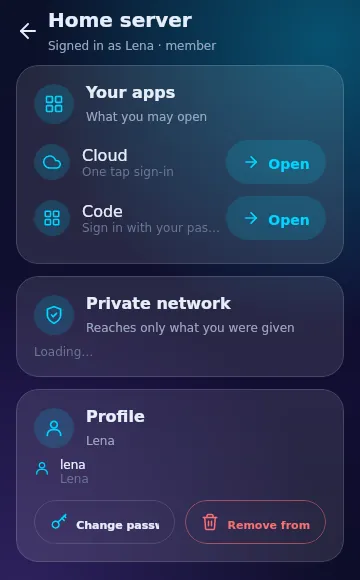
- Your apps, each with an Open button. Some sign you in with one tap.
- Private network, which reaches only what you were given. You can switch the VPN on and off.
- Your profile, notifications and appearance.
There is no Add a server, and the settings list is short: Notifications, App updates, Permissions, Privacy, Appearance and About.
Coming next
A member's phone cannot yet refresh its own key from the app. That needs a server route that does not exist yet, so the app does not offer it.
See also Connect the app for the older pairing code, and Phone apps and privacy.